Posts

How to automate running of Apache and MySQL in XAMPP
Image
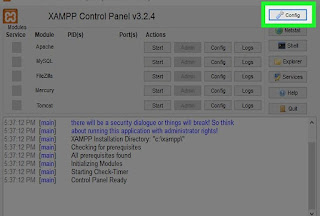
1. Open notepad and enter the below commands @ echo off start C:\xampp\xampp-control.exe 2. Save as .bat file 3. Open your XAMPP application, click on 'config' button. 4. Check the check boxes of required servers. 5. Click on save. 6. Go to the location, where the batch file is saved and open the .bat (you can double click on it). That will open XAMPP application and run the chosen servers.


How to wash a copper bottle

Image
 1. Pour some lemon juice into the bottle. If you don't have lemon, you can use tamarind juice. 2. Add some rock salt. 3. Leave it for 1 hour. 4. Wash it off, that's it. Before and After:

Maintain history of copied text and save your time in windows

Image
 If you are working projects, where you've copy paste couple of text multiple times, here is the hack. How to Save the copied text (Ctrl + C): 1. Click on Windows key in keyboard. 2. Search for Clipboard Settings or you can also find this under System > Clipboard in settings 3. Toggle the `on` button of the Clipboard history. How to paste/see the copied text from the clipboard : 1. Click Windows + V keys at a time. 2. Clipboard with copied text will show up, click on any text you wish to paste.

Add key-value pair to every object in array of objects in JavaScript

Image
Sometimes, we've to add flag or some new key-value pair to every object in array of objects. For that we can follow three ways to achieve it. For suppose, we have an array of objects as below and we want to add gender key to all the objects     students  = [     {        name:   'Radhika' ,        age:   26 ,     },     {        name:   'Radha' ,        age:   24 ,     },     {        name:   'Jyothi' ,        age:   25 ,     },   ]; // Expected Output    students  = [     {        name:   'Radhika' ,        age:   ...

Avoiding multiple API calls in Angular by using shareReplay method of RxJS

Image
While working with some Angular projects, we've to subscribe the same api in to different methods in a component. In order to avoid that we can use shareReplay method of RxJS. Lets consider an app which has two buttons and two different methods gets called on clicking on those buttons. But, internally the two methods will subscribe the same api two times. Suppose user clicks the button multiple times, then we've to call the same api multiple times to display the number of completed/incomplete tasks. On clicking the `Completed Todos` and `Incomplete Todos` buttons, same API got two times. This will increase the load on server and increase the loading time of UI. Henceforth, reduces the performance of our application. We can avoid calling multiple API services with the help of shareReplay method of RxJS. shareReplay  subscribes the observable, caches the response and multicasts it to all the subscribers without calling the API multiple times. Lets see the above example with share...

Extract list of values from an array of objects to an array based on a key in JavaScript.

Image
There may be a situation where you want to extract the list of values of a specific key from an objects to an array.  Method 1: In one way, we can use both for loop and Array.push() method and achieve it.  For example, we have an Array of objects as below let studentsObject = [     {         "name" : "John" ,         "age" : 26     },     {         "name" : "Helen" ,         "age" : 42     },     {         "name" : "Cole" ,         "age" : 54     },     {         "name" : "Noah" ,         "age" : 38     } ] we can extract the values as shown below  let namesList ; studentsObject . forEach ( student => {     namesList . push ( student . name ) }); console . log ( namesList ); //Output [ 'John' , 'Helen' , 'Cole'...